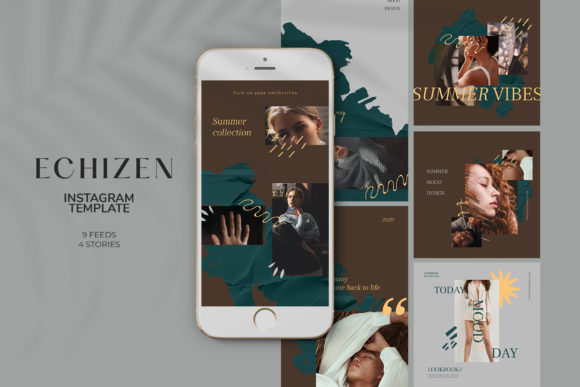
Echizen Instagram Templates: A Practical Guide for Designers and Content Creators
For designers and content creators looking to streamline their Instagram post creation process, Echizen Instagram Templates offer a structured and efficient solution. These templates are designed to meet the needs of users who want high-quality, ready-to-use visual assets without the complexity of starting from scratch. Whether you're managing multiple accounts or working on personal projects, understanding the features and limitations of Echizen Instagram Templates can help you determine if they align with your workflow.
What Makes Echizen Instagram Templates Unique?
Echizen Instagram Templates stand out due to their focus on usability, flexibility, and technical specifications that cater to professional-grade design requirements. The templates are built with a clear understanding of Instagram's platform standards, ensuring that the final output is optimized for both desktop and mobile viewing. This makes them particularly useful for users who prioritize consistency across different devices and screen sizes.
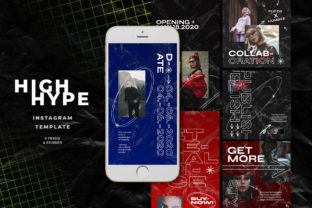
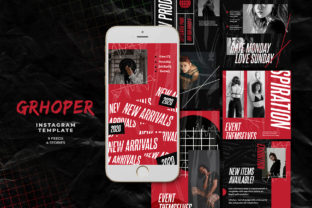
The templates include a variety of pre-designed layouts that can be customized to fit specific branding or content themes. They support a range of post formats, including standard square posts, landscape-oriented images, and story-sized visuals. This versatility allows users to maintain a cohesive aesthetic while adapting to different content types and audience preferences.
Technical Specifications and Design Flexibility
One of the key advantages of Echizen Instagram Templates is their adherence to industry-standard technical specifications. The templates are created in a 1200px x 1200px format for standard posts and 1920px x 1080px for landscape-oriented content, with additional options for stories at 1080px x 1920px. These dimensions ensure that your visuals will look sharp and professional on all platforms.
The file format provided is a PSD (Photoshop Document), which offers advanced editing capabilities. Users can take advantage of Photoshop's layer-based system to modify elements such as text, graphics, and background compositions. The inclusion of smart objects allows for easy image replacement without compromising the quality of the original design. To update an image, simply double-click on the smart object layer, replace the content, and save the file using CTRL + S.
In addition to image editing, the templates support full text editing through the text tool. This means that any text elements—such as captions, headlines, or labels—can be modified to match your brand voice or message. This level of customization ensures that the templates are not just visually appealing but also functionally adaptable to a wide range of use cases.
Color and Resolution Considerations
Echizen Instagram Templates are set up for RGB color mode, which is ideal for digital displays and online sharing. This ensures that colors appear vibrant and accurate when viewed on screens, making it a suitable choice for social media content. However, users should be aware that RGB is not the preferred format for print materials, so this may be a consideration if your work involves cross-platform applications.
The templates are also created at 300 dpi, which is the standard resolution for high-quality printing. While this may not be necessary for most Instagram posts, it provides a level of detail that can be beneficial for users who plan to repurpose their designs for other media or need a higher-resolution version for specific purposes.
Comparing Echizen Instagram Templates to Alternatives
When evaluating Echizen Instagram Templates, it's helpful to compare them with other available tools and resources. Many designers opt for free or low-cost alternatives, such as Canva templates or stock design sites. While these options may be more accessible, they often lack the depth and customization options found in Echizen templates.
Free tools like Canva provide user-friendly interfaces and a wide range of pre-designed elements, making them a good option for beginners or those with limited design experience. However, they may not offer the same level of control over technical aspects like resolution, color mode, or layer structure. For users who require precision and flexibility, Echizen Instagram Templates may be a better fit.
On the other hand, some premium design platforms offer similar templates with additional features such as animation support, interactive elements, or integration with social media management tools. These platforms may appeal to users who need a more comprehensive solution that goes beyond static image creation. However, they often come with a steeper learning curve and higher cost compared to Echizen templates.
Best Use Cases for Echizen Instagram Templates
Echizen Instagram Templates are particularly well-suited for users who have a basic understanding of design software and want to save time without sacrificing quality. They are ideal for small businesses, influencers, and content creators who need consistent, professional-looking visuals for their Instagram presence.
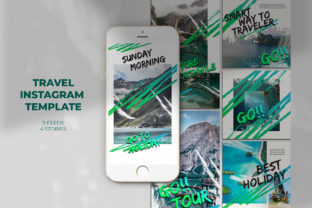
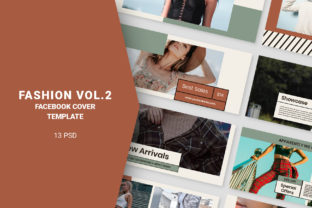
For example, a fashion brand might use Echizen templates to create a series of product showcases that maintain a unified style across all posts. A travel blogger could leverage the templates to produce visually engaging stories that highlight destinations in a cohesive manner. In both cases, the templates provide a foundation that can be easily adapted to fit specific content needs.
However, users who are new to design software or prefer a more hands-off approach may find the templates less intuitive. In such cases, alternative solutions that offer drag-and-drop functionality or automated layout generation might be more appropriate.
Limitations and Tradeoffs
While Echizen Instagram Templates offer many benefits, they are not without limitations. One notable drawback is that they do not include image models, meaning users must source their own images or use stock photography. This can add an extra step to the design process, especially for those who rely on pre-selected visuals.
Additionally, the reliance on Photoshop for editing means that users without access to the software may face challenges. While there are alternative programs that can open PSD files, they may not support all features, potentially limiting the extent of customization possible.
Another consideration is the time investment required to fully utilize the templates. While they provide a solid framework, achieving a polished result often requires some level of design knowledge and attention to detail. Users who are looking for a completely automated solution may find this process too involved.
When to Choose Echizen Instagram Templates
Echizen Instagram Templates are a strong choice for users who value control, quality, and adaptability in their design workflow. If you're looking to create professional-grade content consistently and have the technical skills to make adjustments, these templates can significantly enhance your productivity.
They are especially beneficial for users who want to maintain a consistent visual identity across their Instagram feed and stories. By providing a structured layout, the templates help ensure that each post aligns with your brand's aesthetic while allowing room for creative expression.
When to Explore Other Options
If your primary goal is speed and simplicity, or if you're working within a tight budget, other options may be more suitable. Free design tools, pre-made templates from stock marketplaces, or AI-powered content generators can offer a more streamlined experience with less technical overhead.
Similarly, if you're looking for a more dynamic or interactive design experience, platforms that support video, animation, or real-time collaboration may be a better fit. These tools cater to different use cases and can provide unique advantages depending on your specific needs.